Changes to the Microsoft Entra API or to Becard may cause the number of user accounts to differ from the number of digital business cards.
Why can discrepancies occur?
Possible causes include:
- Connected User Accounts is disabled.
- References are missing or incorrect, for example due to a different Entra version or changes to the data protocol by Microsoft.
- When User Mappings are not configured correctly
Difference between user accounts and digital business cards
A user account can only be created once per combination of email address and reference number.
Digital business cards, on the other hand, can be created multiple times. As a result, the number of business cards may differ from the number of user accounts.
Resolve discrepancies
1. Enable Connected User Accounts
First, make sure that Connected User Accounts and Enable Deletion are enabled.
You can then check and clean up the assignments via the following menu item:
Directory → Connected Users → Clear & Create or → Clear & Delete
Clear & Create reconciles the digital business cards with the user accounts. If a user account exists but no digital business card is available, a digital business card is created and linked to the user account. If multiple business cards are linked to the same user account, all business cards except the first one created are deleted. This ensures that one user account is always linked to one digital business card.
Clear & Delete reconciles the digital business cards with the user accounts. If no user account is linked to the respective business card, the digital business card is deleted. If no digital business card is linked to the respective user account, the user account is deleted.
2. Start a resync in Microsoft Entra
Then start another resync in Microsoft Entra.
This causes becard to reconcile the existing user data with the data from Microsoft Entra again.
3. Remove user accounts that no longer exist
This process may take several days
Important: The Clear & .. process must be performed before the resync.
After the resync has been fully completed, you can use
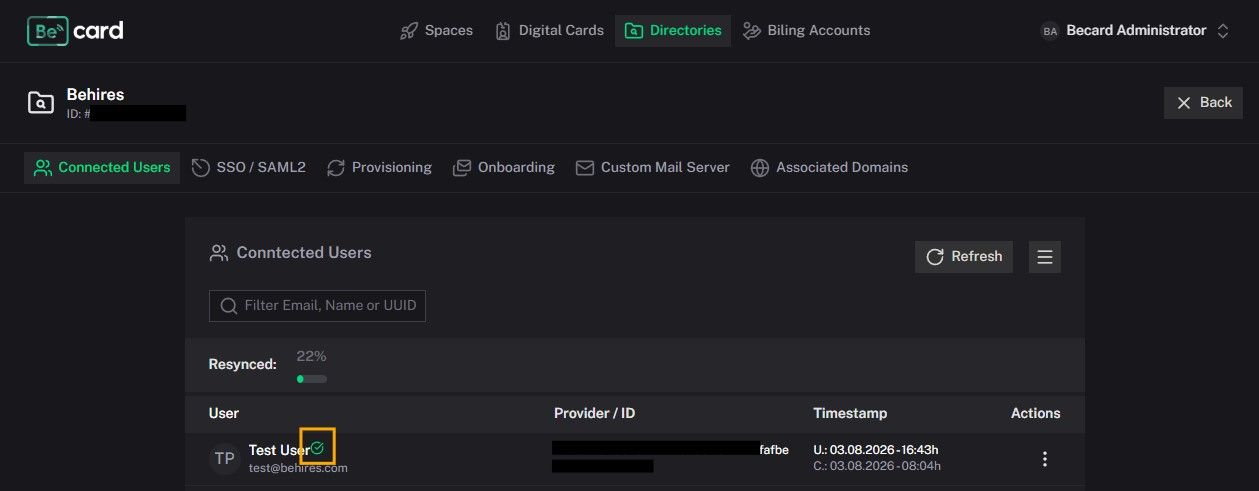
Directory → Connected Users → Clear Accounts
to delete the user accounts that no longer exist under Users in Microsoft Entra.
The system checks which user accounts exist in Active Directory and reconciles them with Becard. If the user exists in the Becard Entra application, the orange circle changes to a green checkbox. All users with an orange circle after their name are either a) not yet synchronized or b) no longer exist; these users, along with their user accounts and digital business cards, are deleted.
Result
After completing these steps, the discrepancies between the user accounts and the digital business cards should be resolved.
Comments
0 comments
Please sign in to leave a comment.