These settings can be found in the selected space in Becard Enterprise under "Digital Cards".
There are various ways to link a user to a digital business card.
Linking options
1. When creating a digital business card
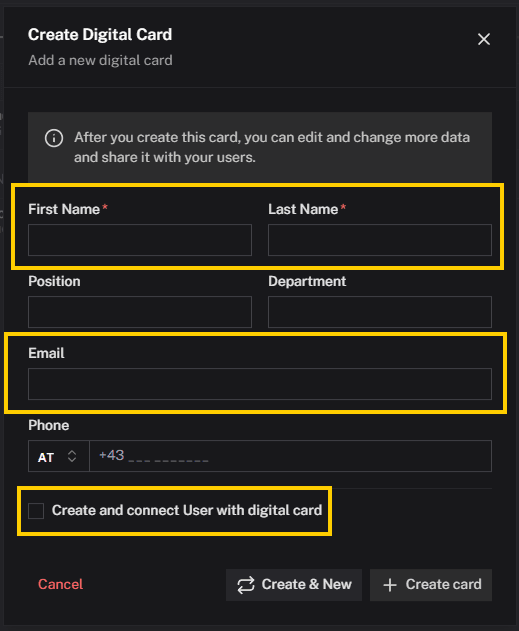
When creating a new digital business card, the user can be assigned directly:
Space → Digital Cards → Create -> Clicking the checkbox is required. A new user account can be created at the same time during the creation process. If a user account with the email address being used already exists, the card is automatically linked to this user account.
2. Linking afterwards
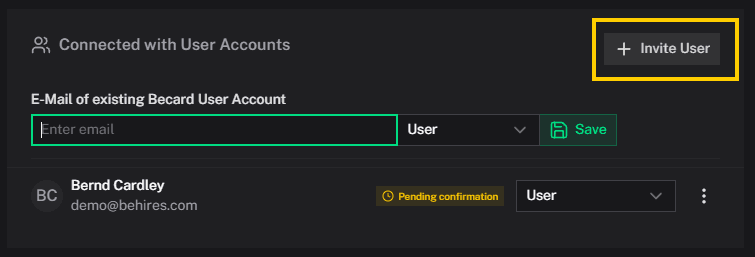
An existing digital business card can be linked to a user at any time afterwards:
Space → desired digital business card → Connections
3. Via SCIM provisioning
Users and their links can be provisioned automatically via SCIM.
For more information, see: Enterprise → SCIM
SCIM automatically creates new user accounts or uses existing user accounts for the link.
4. Via Excel import
Users and digital business cards can also be created and linked to each other via Excel import.

Requirements
To link a user to a digital business card, one of the following criteria must be met:
- A user account already exists. Employees can register themselves independently via the Becard app.
- When creating a digital business card via a space, a new user account can be created at the same time.
- When provisioning via SCIM, user accounts are created automatically or existing accounts are used.
Notes
- A user can only be assigned to a digital business card using an existing user account.
- Changes to the link can be made at any time via the Connections section of the respective digital business card.
Comments
0 comments
Please sign in to leave a comment.