These settings can be found in the selected Directory in Becard Enterprise under “Custom Mail Server”.
Becard Enterprise's SMTP function allows emails to be sent directly through your own mail server. This means that emails are sent using your own company domain and presented professionally.
Requirements
The following information from the email provider is required for setup:
- SMTP server
- SMTP port
- Username
- Password
- Encryption (TLS or SSL)
Supported SMTP ports
| Encryption | Port |
|---|---|
| TLS / STARTTLS | 587 |
| SSL | 465 |
Unencrypted ports such as 25 or 2525 are often blocked and should not be used.
Configure SMTP data
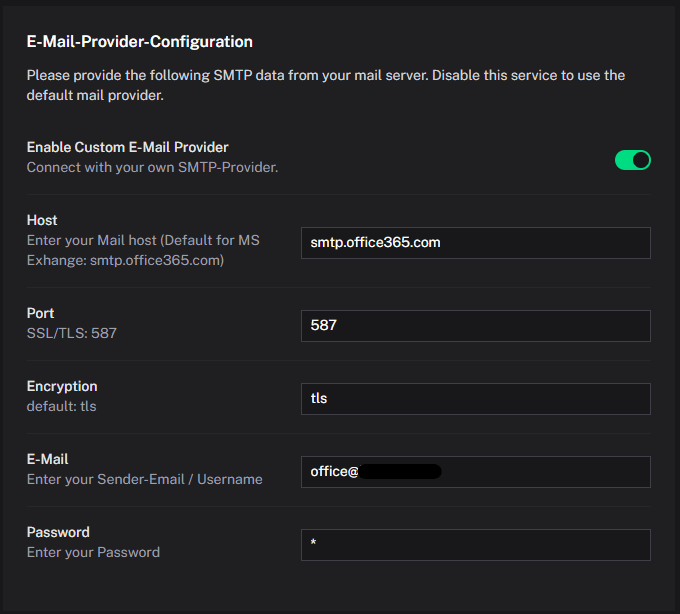
Enter your email provider's SMTP data in Becard Enterprise.
| Field | Description |
|---|---|
| Host | SMTP server of the email provider |
| Port | SMTP port |
| Full email address of the mailbox | |
| Password | Password for the email account |
| Encryption | TLS or SSL |
| Sender address | Email address used as the sender |
Example configuration
Note: The password is not displayed for security reasons.
Test the connection
After successful setup, a test email can be sent via the “Onboarding” section.
If the connection fails, the following points should be checked:
- Username and password
- SMTP port
- TLS/SSL configuration
- Firewall or hosting restrictions
- SPF, DKIM and DMARC configuration of the domain
Recommended security settings
For optimal deliverability, the following is recommended:
- Enable SPF
- Configure DKIM
- Set up DMARC
- Use TLS encryption
This reduces the likelihood of emails ending up in the spam folder.
Commonly used SMTP servers
| Provider | Server | Port | Encryption |
|---|---|---|---|
| Gmail | smtp.gmail.com | 587 | TLS |
| Outlook / Microsoft 365 | smtp.office365.com | 587 | TLS |
| GMX | mail.gmx.net | 587 | TLS |
| IONOS | smtp.ionos.de | 587 | TLS |
Troubleshooting
Authentication failed
Check:
- Username
- Password
- App password for Microsoft 365 or Gmail
- Access restrictions imposed by the email provider
- The sender email must match the email address or username.
Connection refused
Possible causes:
- Incorrect SMTP port
- Firewall blocking outgoing SMTP connections
- Restrictions imposed by the hosting provider
Emails end up in spam
Check the following DNS and security configurations:
- SPF
- DKIM
- DMARC
- Reverse DNS
Support
If you have questions about the SMTP configuration, please contact your email provider or your internal IT department.
Comments
0 comments
Please sign in to leave a comment.